

AI Flashcards: Benefits, Risks, and a Better Study Workflow
 EducateAI Editorial Team
AI flashcards are useful when they remove mechanical work from studying: extracting candidate questions, turning notes into first drafts, and helping you start a review routine faster.
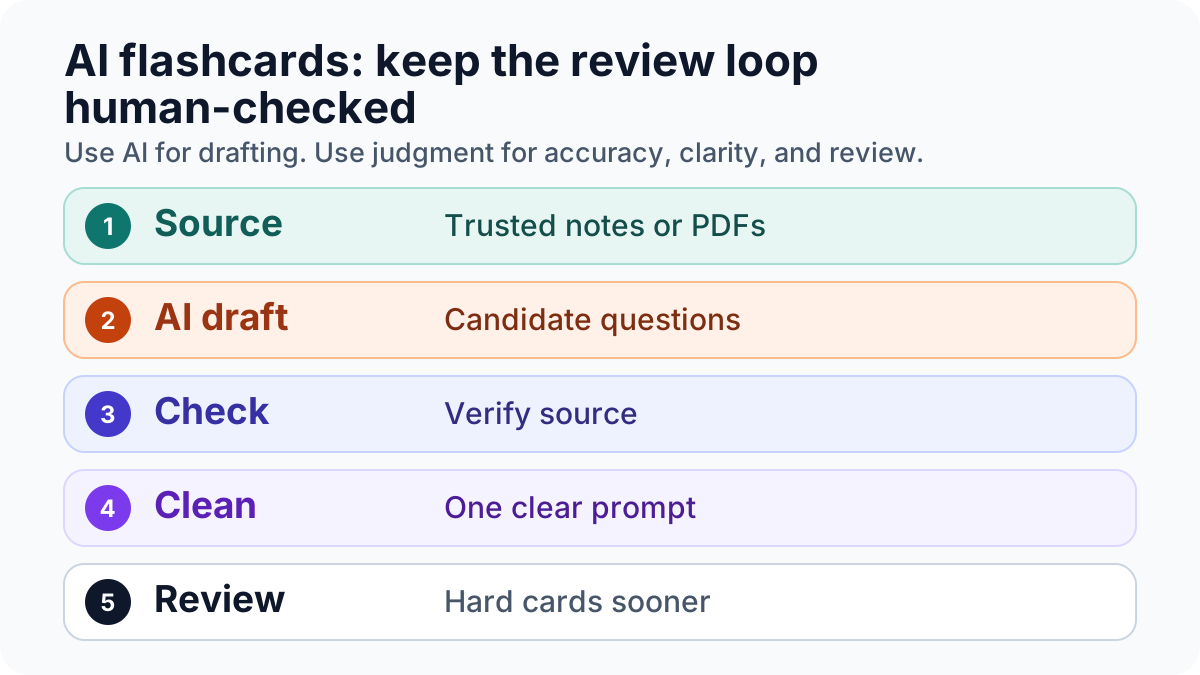
They are not useful when they replace the learning work itself. A generated card can be vague, too broad, unsupported by the source, or easy to recognize without true recall. That is why the best workflow is not "let AI make the deck and memorize it." It is:
- start from trusted source material
- let AI draft possible cards
- check every card against the source
- rewrite weak cards into clear active-recall prompts
- review with spaced repetition
If you want the card-writing rules first, start with How to Create Flashcards. If you want the broader topic hub, use the Flashcards Hub.
When AI Flashcards Actually Help
AI-assisted flashcards are strongest when the source material is already available and you need a faster way to turn it into review tasks.
Useful cases include:
- turning lecture notes into first-draft questions
- extracting key terms from a PDF chapter
- creating quick self-test prompts after a study session
- producing alternative phrasings for a difficult concept
- finding overloaded cards that should be split
This matches the practical EducateAI workflow: upload course material, generate flashcards from that material, answer before reveal, and continue with spaced repetition. The important part is that the card is tied back to what you are studying, not invented from a generic prompt.
Where AI Flashcards Can Fail
The biggest risk is not that AI flashcards are useless. The risk is that they can make weak cards look polished.
Common failure modes:
| Failure | What it looks like | Fix |
|---|---|---|
| Unsupported card | The answer is not clearly in your source | Check the source before importing |
| Overloaded card | One card asks for a list, process, and exception | Split it into smaller prompts |
| Recognition trap | The wording makes the answer obvious | Rewrite it as a recall question |
| Vague answer | You cannot tell whether you got it right | Add a short, checkable answer |
| Wrong level | The card asks for a definition when the exam asks for application | Add an example or scenario prompt |
AI can help draft, but it cannot know your exam format, professor emphasis, or source reliability unless you give it that context and review the result.
The Better Workflow: Draft, Check, Rewrite, Review
1. Start From Source Material
Use lecture slides, your textbook chapter, seminar notes, or a cited answer from a study tool. Avoid asking for a generic deck on a broad topic unless you only need orientation.
Better prompt:
Create 12 flashcards from these lecture notes. Use only information in the notes. Make each card test one idea. Mark any point that is unclear from the source.
Weaker prompt:
Make flashcards about photosynthesis.
The second prompt may produce plausible cards, but it does not know what your course actually covers.
2. Let AI Create A First Draft
AI is good at turning dense text into possible questions. That saves time, especially after long lectures or PDF-heavy courses.
But treat the output as a draft. A generated deck should not go directly into review. First, remove duplicate cards, vague questions, and anything not supported by the material.
3. Check Every Card Against The Source
This is the step students are tempted to skip. It is also the step that makes AI flashcards safer.
For each card, ask:
- Is the answer directly supported by my source?
- Would I know what counts as correct?
- Is the card asking one thing?
- Does the question train recall instead of recognition?
- Is this actually relevant to my exam or assignment?
If the answer is no, rewrite or delete the card.
4. Rewrite For Active Recall
Good flashcards force you to retrieve before seeing the answer. That matters because retrieval practice has stronger learning value than passive rereading alone.1
Weak:
Photosynthesis definition?
Better:
What does photosynthesis convert, and what energy source drives the process?
For harder courses, add application cards:
A plant receives light but lacks CO2. Which part of glucose production is blocked, and why?
That kind of card is slower to write, but it tests understanding instead of word matching.
5. Review With Spacing
Spaced review matters because long-term memory improves when practice is distributed over time rather than crammed into one session.2
You do not need a perfect interval system to start. Use a simple pattern:
- review new cards today
- repeat weak cards tomorrow
- push easier cards out by several days
- rewrite cards that repeatedly fail
The point is not to obey a magic schedule. The point is to see difficult cards sooner and easy cards later.
AI Flashcards vs Manual Flashcards
| Question | Manual cards | AI-assisted cards |
|---|---|---|
| Best use | Deep processing while writing | Faster first drafts from source material |
| Main risk | Slow, inconsistent creation | Plausible but unchecked output |
| Best quality control | Write one idea per card | Verify, split, and simplify every card |
| Best for | Small high-stakes topics | Large note packs, PDFs, and review setup |
Manual cards are not obsolete. They are still useful when writing the card is part of how you learn. AI-assisted cards are useful when the bottleneck is turning a large amount of source material into a manageable first review set.
What To Look For In An AI Flashcard Tool
Choose tools based on workflow quality, not just generation speed.
Look for:
- source-based generation from your own notes or PDFs
- editable cards before import
- answer-before-reveal review
- spaced repetition or review scheduling
- clear progress feedback
- export options if you want platform control
- privacy terms that fit your course material
Avoid tools that only promise instant decks without giving you a serious review and correction step.
How EducateAI Fits This Workflow
EducateAI is designed around the source-to-review loop: work from your course material, generate level-based flashcards, answer before reveal, and continue with spaced repetition and feedback.
That does not remove the need for student judgment. The better use case is to let the tool handle drafting and review structure while you verify the cards, remove weak prompts, and focus on the concepts that actually matter for your course.
For the product workflow, see AI Flashcards. For card design rules, use How to Create Flashcards.
Practical Checklist Before You Study An AI-Generated Deck
Before you begin review, check:
- every card is supported by your source
- every card asks one clear thing
- answers are short enough to grade yourself
- important cards include examples or application prompts
- duplicate and low-value cards are removed
- weak cards are rewritten after failed reviews
If a generated card cannot pass this checklist, do not study it yet.
Bottom Line
AI flashcards are not the end of manual studying. They are a better drafting layer when used with source checks, active recall, and spaced repetition.
The winning workflow is simple: use AI to create a draft faster, then use your judgment to make the cards accurate, useful, and reviewable. That is where AI flashcards can improve study habits without turning your deck into a polished pile of weak prompts.
Sources
Footnotes
Roediger, H. L., & Karpicke, J. D. (2006). Test-enhanced learning: taking memory tests improves long-term retention. Psychological Science. https://doi.org/10.1111/j.1467-9280.2006.01693.x ↩
Cepeda, N. J., Pashler, H., Vul, E., Wixted, J. T., & Rohrer, D. (2006). Distributed practice in verbal recall tasks: A review and quantitative synthesis. Psychological Bulletin. https://doi.org/10.1037/0033-2909.132.3.354 ↩
Turn your notes and PDFs into flashcards
Upload lecture notes, slides, or PDFs and get grounded answers with citations plus ready-to-review flashcards.
Was this article useful?
One click helps us improve future guides.
Related Articles
How to Create Flashcards: Rules, Examples, and AI Workflows
Learn the flashcard-writing rules, examples, common mistakes, and AI-assisted workflows that make cards easier to review and remember.
Why ChatGPT Gets Your Homework Wrong (And How Context-Aware AI Gets It Right)
Explore how contextual AI transforms learning outcomes. Understanding context helps AI tools deliver personalized, relevant educational experiences.

Beyond the Textbook: EducateAI Solves Study Challenges
Discover how EducateAI transforms overwhelming study materials into clear, actionable knowledge. Built by students, for real learning challenges.