

Online Flashcards: How to Choose, Create, and Review Better Cards
 EducateAI Editorial Team
Online flashcards are useful when they make review easier to start and easier to repeat. They let you study from your phone, update cards quickly, search your deck, and use spaced repetition without manually sorting paper piles.
But an online tool does not automatically create better learning. A weak card is still weak when it is synced across devices. The real goal is to build cards that force recall, stay tied to your source material, and return at the right time.
If you want the deeper card-writing rules, read How to Create Flashcards. If you want the broader cluster, start from the Flashcards Hub.
When Online Flashcards Are The Right Choice
Use online flashcards when you need:
- review across laptop, tablet, and phone
- a spaced repetition queue instead of manual sorting
- quick editing when a card is vague or overloaded
- image, audio, or formula support
- search, tags, folders, or decks for larger courses
- export or backup before an exam-heavy semester
Use paper when the set is small, temporary, or when handwriting helps you process the material. Many students use both: paper for rough thinking, online cards for long-term review.
What Features Actually Matter
Spaced Repetition
Spaced repetition means difficult cards return sooner and easier cards return later. Distributed practice has stronger long-term value than cramming the same material in one session.1
You do not need a perfect algorithm to start. A basic spaced queue is already better than reviewing everything equally every day.
Answer Before Reveal
The app should make you answer before showing the back of the card. Retrieval practice matters because trying to recall an answer strengthens memory more than rereading alone.2
Avoid review modes that turn studying into recognition. If you only pick from visible options, you may feel fluent without being able to produce the answer on an exam.
Easy Editing
Editing is not a minor feature. It is part of learning. If a card fails three times because the prompt is unclear, rewrite the card.
Good online tools make it fast to:
- split one overloaded card into two or three smaller cards
- shorten long answers
- add a source note
- remove duplicates
- add an example after a mistake
Import, Export, And Backup
If you are building a serious study system, make sure you can export or back up your cards. This matters when you move between apps, share with a group, or want to keep your work after a semester.
How To Create Better Online Flashcards
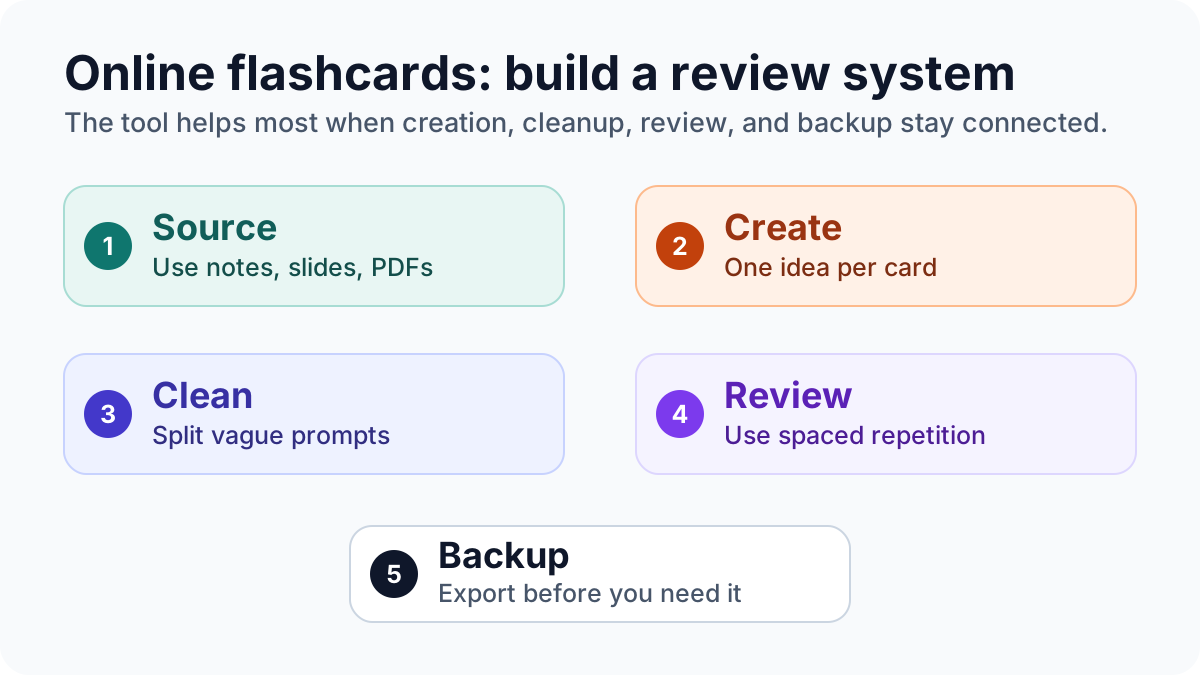
Start with the material, not the app. Your source could be lecture slides, a textbook section, a PDF, a lab protocol, or your own notes.
Use this workflow:
- Pick one source section.
- List the concepts that are likely to be tested.
- Write one card per concept, distinction, or process step.
- Keep the answer short enough to check.
- Add examples only when they make the prompt clearer.
- Review the cards once, then fix anything that felt vague.
If you use AI to draft cards, treat the output as a first draft. Verify every answer against the source before importing it into your review queue. For a safer AI workflow, see AI Flashcards: Benefits, Risks, and a Better Study Workflow.
Card repair loop
The online flashcard quality loop
Good cards improve through retrieval and editing, not through one perfect drafting session.
One-idea card
Write one clear prompt with an answer you can grade honestly.
Retrieve first
Try to produce the answer before revealing the back.
Repair the card
Split, shorten, or clarify cards that fail for the wrong reason.
Schedule the next review
Let difficult cards return sooner and easy cards later.
Online Flashcards vs Flashcard Apps
The phrase "online flashcards" usually means browser-based or cloud-synced cards. A "flashcard app" may work online, offline, or both.
| Need | What to look for |
|---|---|
| Quick review anywhere | Web and mobile sync |
| Long-term memory | Spaced repetition |
| Group studying | Sharing and collaborative decks |
| Course-specific material | PDF, notes, or text-based card creation |
| Platform control | Export or backup |
| Exam prep | Answer-before-reveal and progress tracking |
If you are comparing tools, use Anki vs Quizlet vs EducateAI instead of choosing from a feature list alone.
Common Mistakes
Creating Too Many Cards
Large decks feel productive, but they can bury the useful cards. Start with the concepts most likely to appear in quizzes, assignments, or exams.
Copying Sentences Directly
Copied sentences often create recognition cards. Rewrite the prompt so you have to retrieve the answer.
Weak:
Active recall is a study method.
Better:
What makes active recall different from rereading?
Skipping Source Checks
If a card came from an AI tool, copied deck, or classmate, check it before studying. Wrong cards become stronger in memory when you review them repeatedly.
Keeping Bad Cards
Repeated failure can mean the card is bad, not that you are bad at the topic. Edit weak cards after review.
Simple Review Routine
For a normal course week:
- Create or clean cards within 24 hours of class.
- Review new cards the same day.
- Review again after one or two days.
- Move easy cards farther out.
- Rewrite cards that fail twice.
- Before the exam, mix flashcards with practice questions.
Flashcards help memory. They do not replace problem solving, essay planning, lab interpretation, or past-paper practice.
Bottom Line
Online flashcards are worth using when they give you portability, spaced review, fast editing, and a reliable backup. They are not a shortcut around thinking.
The best setup is simple: create cards from real course material, keep each prompt focused, answer before reveal, review with spacing, and fix weak cards as soon as they show up.
Sources
Footnotes
Cepeda, N. J., Pashler, H., Vul, E., Wixted, J. T., & Rohrer, D. (2006). Distributed practice in verbal recall tasks: A review and quantitative synthesis. Psychological Bulletin. https://doi.org/10.1037/0033-2909.132.3.354 ↩
Roediger, H. L., & Karpicke, J. D. (2006). Test-enhanced learning: taking memory tests improves long-term retention. Psychological Science. https://doi.org/10.1111/j.1467-9280.2006.01693.x ↩
Turn your notes and PDFs into flashcards
Upload lecture notes, slides, or PDFs and get grounded answers with citations plus ready-to-review flashcards.
Was this article useful?
One click helps us improve future guides.
Related Articles

PDF to Flashcards: Turn Lecture PDFs Into Study Cards
A practical PDF-to-flashcards workflow for students: choose the right PDF sections, generate draft cards, verify answers, and review without memorizing noise.

Anki vs Quizlet vs EducateAI: An Evidence-Based Comparison
Compare Anki, Quizlet, and EducateAI by offline access, scheduling, source-based card creation, export, and the study bottleneck each tool solves.

Flashcards Hub 2026
Your central hub for flashcard strategy, creation workflows, and platform comparisons—research-backed guidance for faster retention.